

This article addresses a common problem in standalone-site advertising: conversion numbers in the ad platform do not match those in the CRM. It explains how to build three core GTM triggers (form submission, phone click, and WhatsApp click), and walks through how to set up GA4 conversion events and mark key events. It also covers how to install Google Ads conversion tags and set up offline conversion imports, and applies the calibration logic of Google SEO analysis. Together, these steps help businesses achieve accurate end-to-end conversion tracking and improve the efficiency of their advertising and optimization.
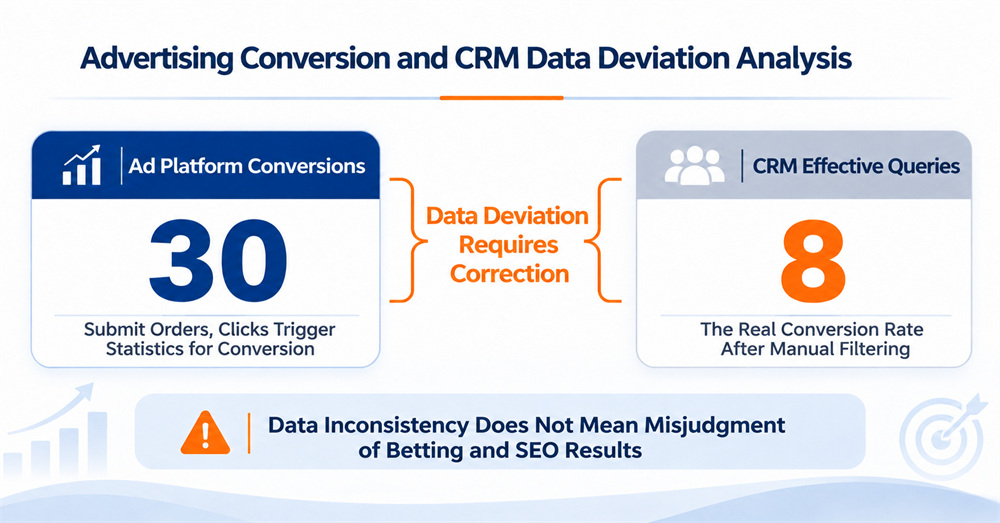
In running a foreign-trade standalone site, conversion data is the foundation for every advertising and optimization decision. Yet many businesses run into the same data discrepancy: the ad platform reports 30 conversions, while the CRM shows only 8 qualified inquiries, a gap that can reach two to three times. Distorted data leads directly to misjudged ad strategies and wasted budget, and it also deprives Google SEO analysis of an accurate benchmark for measuring results. Following Google's official implementation guidelines, building precise conversion triggers in GTM, configuring GA4 conversion events, and completing offline conversion imports are the essential foundation for closing this gap and improving operational efficiency.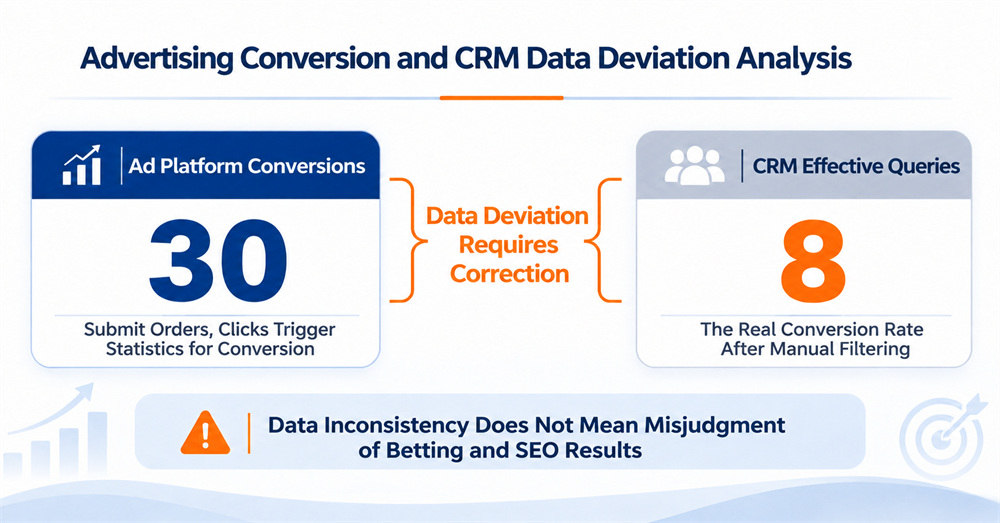
1. Conversion Data Discrepancies: The Hidden Drain on Standalone-Site Advertising
Key takeaway: More than 70% of foreign-trade standalone sites have conversion tracking errors, overstating conversions by more than 2x on average, which directly undermines ad decisions and SEO performance evaluation.
Based on a sample of foreign-trade standalone sites served by Xiamen First Page over the past two years, about 72% had some degree of tracking discrepancy, and the gap was generally wider for B2B categories than for B2C cross-border sites. The causes fall into three main categories. First, loose trigger rules count invalid actions as conversions, such as failed form submissions, duplicate submissions, and internal testing. Second, there is no deduplication mechanism, so multiple submissions from the same user are counted repeatedly. Third, only front-end submissions are tracked, with no link to the back-end CRM's definition of a qualified inquiry, so a “submission” does not equal a “qualified inquiry.”
The damage from inaccurate data spreads across the entire customer acquisition system. On the advertising side, inflated conversion counts cause the ad model to misjudge high-converting keywords and audiences, so budget keeps shifting toward low-efficiency traffic while the channels that truly convert are undervalued. On the SEO side, inaccurate conversion data cannot reflect the real inquiry value of organic traffic, which leads teams to misjudge how well their content and keywords are performing and to drift away from the right optimization direction.
2. Building Core GTM Triggers: Accurately Capturing Three Types of Conversion Actions
Key takeaway: Configuring triggers for form submissions, phone clicks, and WhatsApp clicks in GTM, together with validation rules and IP filtering, can resolve more than 80% of front-end tracking discrepancies.
Google Tag Manager (GTM) is the mainstream tag management tool and the standard way to implement Google Ads conversion tags, since it lets you adjust tracking rules flexibly without modifying the website's source code. For the three most important inquiry actions on a foreign-trade standalone site, you need to build a separate trigger for each, with validation logic to prevent invalid conversions from being counted.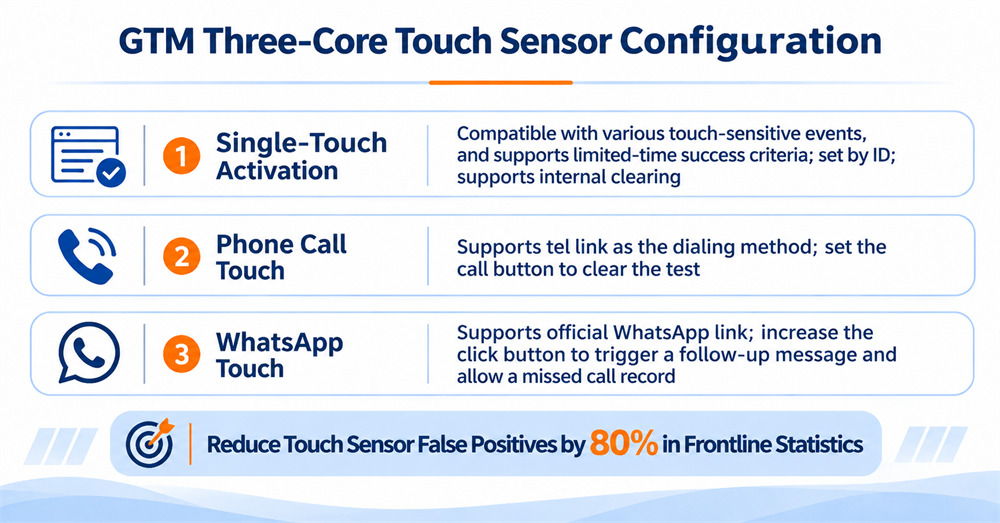
2.1 Configuring the GTM Form Submission Trigger
Form submission is the most important conversion action, and also the one most prone to tracking errors. Many sites use the default form submission trigger directly, which counts failed submissions, page refreshes, and repeated clicks as conversions. A correct setup adds two layers of validation. The first is submission result validation: use the thank-you page path or a data-layer event fired by a successful submission as the trigger condition, so the conversion event fires only after the form has been submitted successfully. The second is precise form matching: use the form ID or a dedicated class name to limit the trigger's scope, so that other forms across the site (such as newsletter sign-ups and search boxes) do not fire the inquiry conversion.
The practical steps are as follows. In GTM, create a new trigger and select the “Form Submission” type, then enable the “Wait for Tags” and “Check Validation” options. Add a trigger condition based on the dedicated page path or event parameter that appears after a successful submission, and exclude internal testing IP ranges.
2.2 Configuring the Phone Click Trigger
For the call button on a page, configure a click trigger that matches link actions using the tel: protocol. Filtering rules are also needed here: exclude test clicks from internal IPs, and limit the trigger to the dedicated inquiry phone button so that other text on the page formatted like a phone number does not fire it by mistake.
2.3 Configuring the WhatsApp Click Trigger
For the WhatsApp inquiry button, configure a click trigger that matches official redirect links such as wa.me and api.whatsapp.com. In addition to internal IP filtering, you can add a click delay check to exclude accidental clicks that are closed immediately, which further improves tracking accuracy.
Once all three triggers are configured, run a full end-to-end test in GTM Preview mode. Confirm that the trigger logic behaves as expected in different scenarios, including normal submissions, failed submissions, and duplicate submissions, before publishing.
3. Configuring GA4 Conversion Events: Key Event Marking and Deduplication Logic
Key takeaway: Knowing how to set up GA4 conversion events, marking key events properly, and configuring deduplication rules are the critical steps for connecting traffic data with business data.
GTM handles front-end event collection, while GA4 handles event classification, deduplication, and conversion definition. An accurate configuration is the basis for ad optimization, and it also provides reliable conversion data for Google SEO analysis.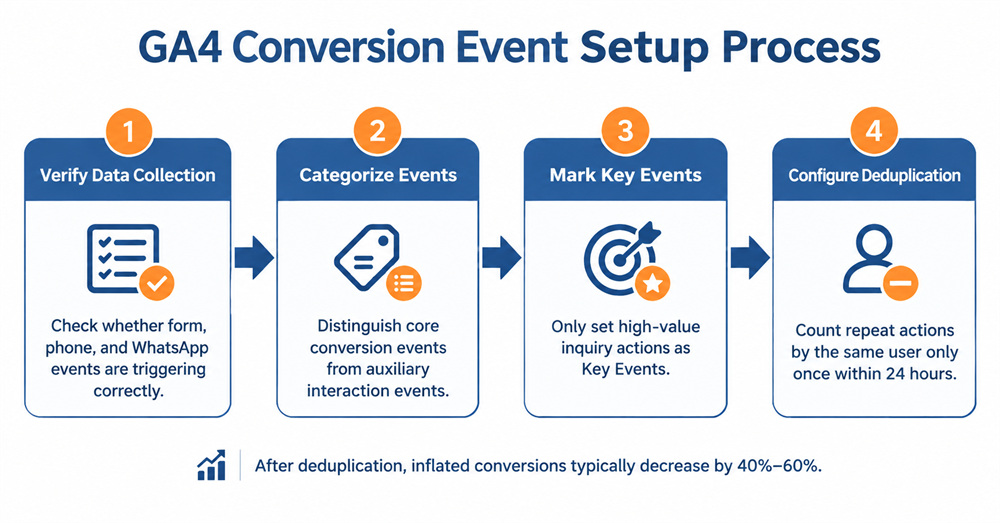
3.1 Event Validation and Classification
After configuration, first verify that events are firing correctly in the GA4 Realtime report. Check that the trigger counts, trigger pages, and user attributes for form submissions, phone clicks, and WhatsApp clicks match expectations, and rule out duplicate firing and firing on the wrong pages. Once confirmed, classify the events into tiers. Set the form submission that corresponds to a qualified inquiry as the core conversion event, and treat phone and WhatsApp clicks as supporting engagement events, so that counting every action as a conversion does not inflate your data.
3.2 Marking Key Events
In the GA4 event management interface, mark the core form submission event as a “key event,” which corresponds to goal conversions in the older Universal Analytics. Key events are the core metric for measuring conversions in GA4, and they sync to advertising and traffic performance analysis. Mark only actions with genuine business value as key events. Lower-value actions such as newsletter sign-ups and downloads can be tracked separately as regular events, so that your conversion data stays undistorted.
3.3 Configuring Conversion Deduplication Rules
Multiple form submissions or repeated clicks on an inquiry button by the same user within 24 hours are a major cause of inflated conversion counts. In GA4, you can configure deduplication logic using user identifiers, session IDs, and event timestamps, so that repeated identical actions by the same user within the same session count as only one valid conversion.
Xiamen First Page's practical data shows that after deduplication rules are configured, reported conversions on most sites drop by 40% to 60%. The numbers then come much closer to the actual volume of qualified inquiries in the CRM, which greatly improves their value as a basis for decisions.
4. Google Ads Conversion Integration and Offline Imports: Improving the Precision of Your Bidding Model
Key takeaway: Knowing how to install Google Ads conversion tags and import offline conversions is an advanced Google Ads technique that lets the ad model optimize for real inquiries rather than just form submissions.
Many businesses stop configuring once front-end conversion tracking is in place. As a result, the ad model can only optimize for the “form submission” action and cannot tell qualified inquiries from invalid ones, which is the core bottleneck limiting targeting precision. Only by completing offline conversion imports can the ad system truly learn the characteristics of high-value customers.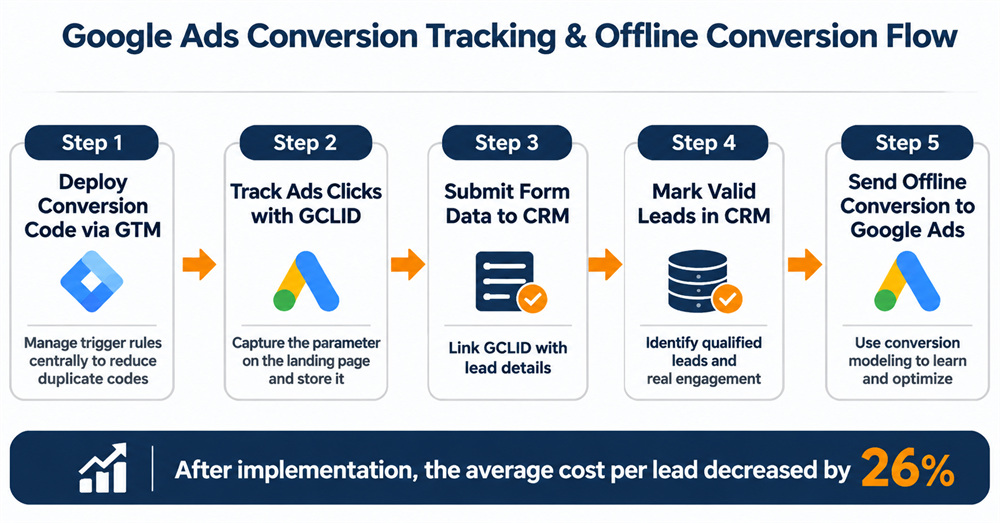
4.1 Deploying Google Ads Conversion Tags
Deploying the Google Ads conversion tag through GTM and linking it to the key events in GA4 is currently the most flexible and compliant approach. Compared with pasting the code directly into pages, GTM deployment lets you adjust trigger conditions and update tag versions at any time without touching the website's source code, and it avoids the duplicate counting caused by multiple versions of the code coexisting.
After configuration, use the Google Ads conversion testing tool to verify that data is being transmitted correctly, and confirm that conversion events sync accurately to the ad platform.
4.2 Offline Conversion Import Solution
For B2B foreign-trade standalone sites, a form submission is only the first step of an inquiry. Whether the contact is a qualified customer, and whether a deal is eventually closed, must be determined in the CRM. With Google Ads' offline conversion import feature, you can send qualified inquiries and closed deals from the CRM back to the ad platform to continuously optimize the bidding model.
The implementation works as follows. When a user arrives at your site by clicking an ad, the URL carries a GCLID parameter, and the site stores this parameter in the CRM together with the user's form details and contact information. After your team marks the lead in the CRM as a “qualified inquiry” or a “closed deal,” the GCLID, conversion time, and conversion value are sent back to Google Ads.
Our service data shows that after 3 to 4 weeks of model learning, accounts with offline imports in place saw the cost per qualified inquiry fall by 26% on average, the share of invalid submissions drop significantly, and both targeting precision and ROI improve markedly.
5. Conversion Tracking Self-Check List for Foreign-Trade Standalone Sites
The following six checks help you quickly identify common problems in your site's conversion tracking. We recommend that your operations team review them once a month to keep the data accurate:
1. Trigger validation: Do the GTM triggers for forms, phone clicks, and WhatsApp clicks include success validation conditions, and are internal IP exclusion rules configured?
2. Event deduplication: Is a 24-hour same-user deduplication rule configured in GA4, and are there cases where a single action fires an event multiple times?
3. Tag deployment: Is the Google Ads conversion tag deployed properly through GTM, and are there cases of duplicate pasted code or multiple code versions coexisting?
4. Parameter capture: Does the site fully capture the GCLID parameter and store it in the CRM along with the form information?
5. Key event marking: Are only high-value inquiry actions marked as key events in GA4, and are any low-value actions being counted as conversions?
6. Data reconciliation: Do you compare conversions in the ad platform, GA4 conversions, and qualified CRM inquiries every week, and investigate your setup immediately if the gap exceeds 20%?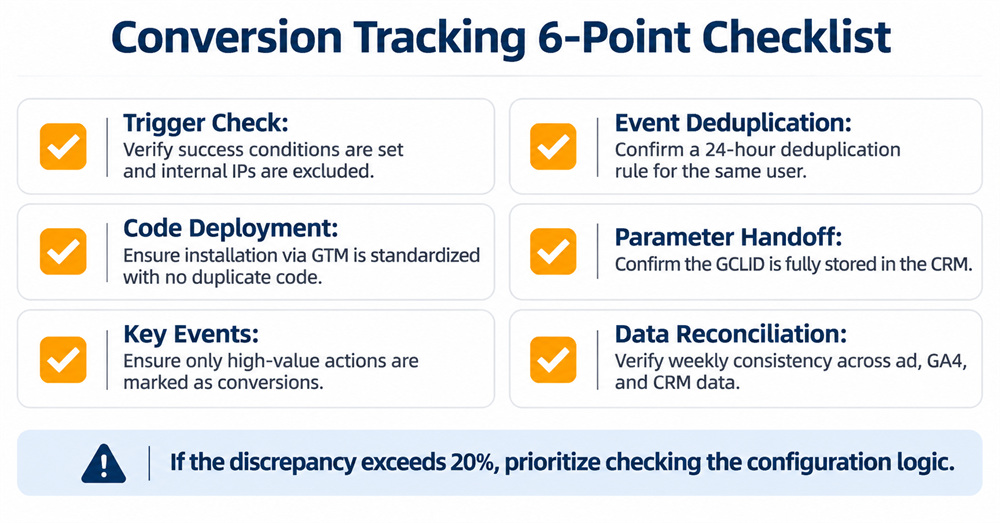
Conversion tracking is the data foundation of all digital marketing work, and distorted data pushes every advertising and optimization effort in the wrong direction. From building precise GTM triggers, to configuring GA4 conversion events, to importing offline conversions from the back end, only a standardized end-to-end deployment can deliver data you can trust and give decision-makers a reliable basis.
As a Google Partner for 11 consecutive years, Xiamen First Page brings 20 years of foreign-trade digital marketing experience and has served more than 10,000 export businesses. Our technical and advertising teams strictly follow Google's official guidelines and provide end-to-end conversion tracking services, from GTM deployment and GA4 configuration to offline imports. We help businesses resolve data discrepancies, achieve accurate Google SEO analysis and better standalone-site ad performance, and steadily improve the return on their overseas customer acquisition.