

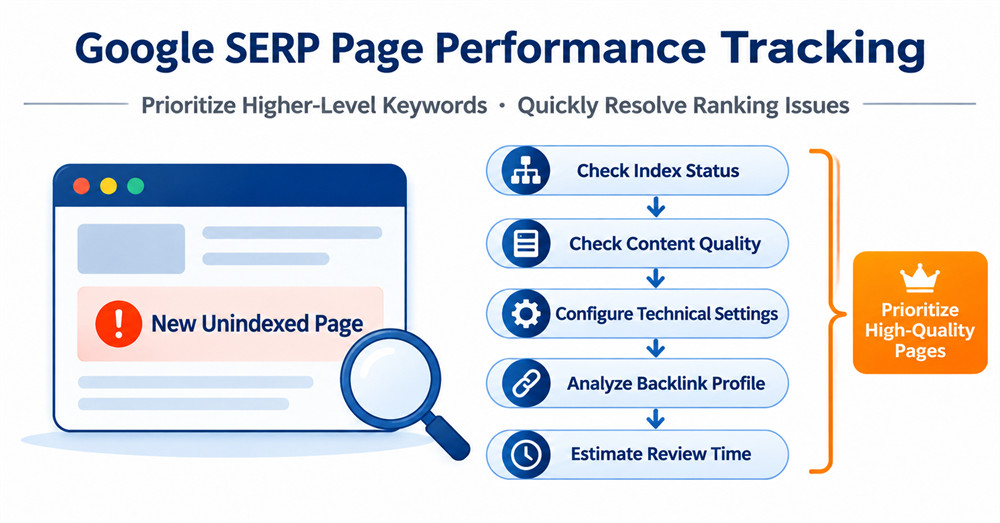
For standalone foreign-trade websites, one of the most common pain points is a new page that stays out of Google's index for weeks or even months. When a new page fails to get indexed, many operators resubmit the sitemap over and over or add content blindly, without a standardized troubleshooting process. This wastes time and never addresses the root cause. According to Xiamen First Page's analysis of nearly 1,000 foreign-trade sites, 85% of stalled indexing cases fall into five common categories. By working through them in a fixed order of priority, teams can pinpoint the core cause in 1-2 working days on average, far faster than trial and error without a clear direction.
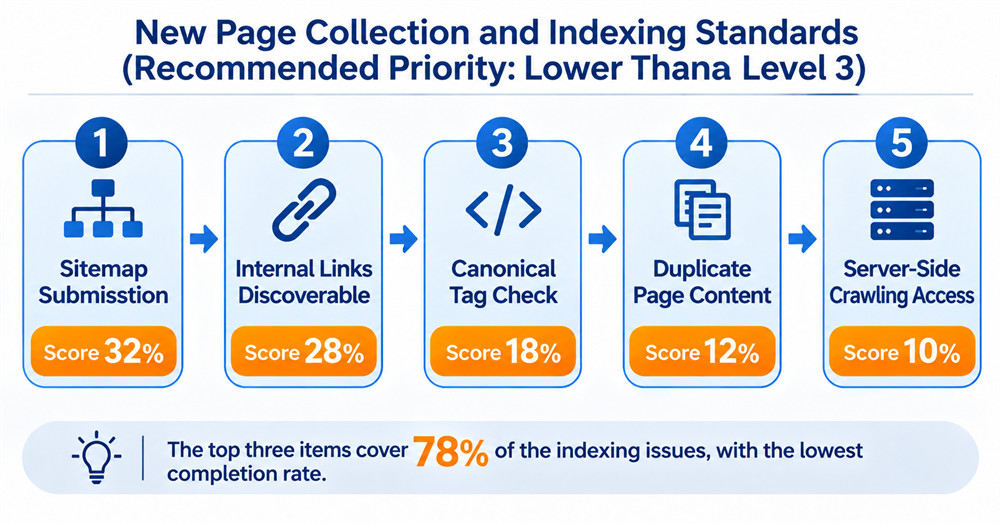
Indexing troubleshooting follows a simple principle: start with the most frequent and easiest-to-check issues, then move on to the less common and deeper ones. Verify configuration and rule-related issues first, then investigate content quality and underlying server problems. The standard order is: Sitemap submission status → internal link depth and discoverability → Canonical tag accuracy → duplicate content and page quality → server response and crawl barriers. The first three categories account for 78% of all indexing failures and are very cheap to check, which makes them the first areas to verify.
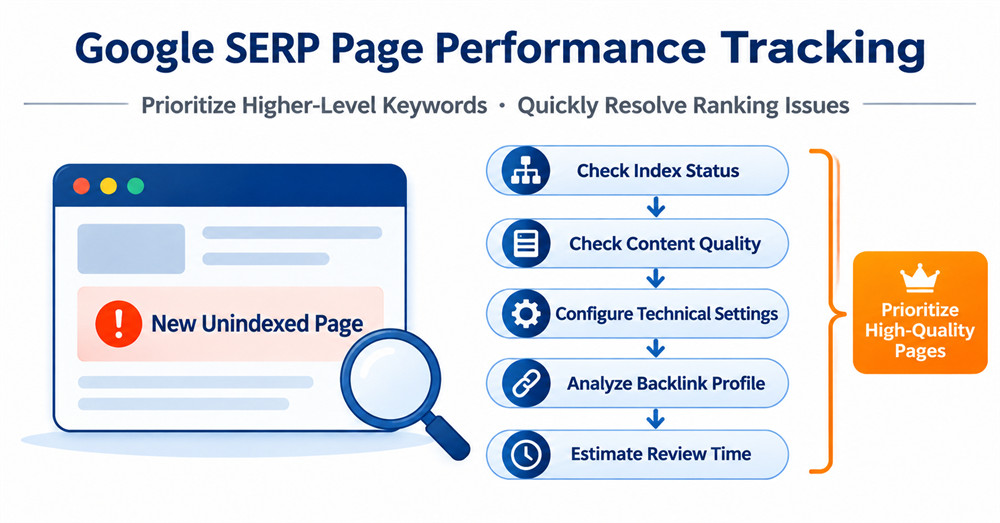
Step 1: Check Sitemap Submission Status and File Validity
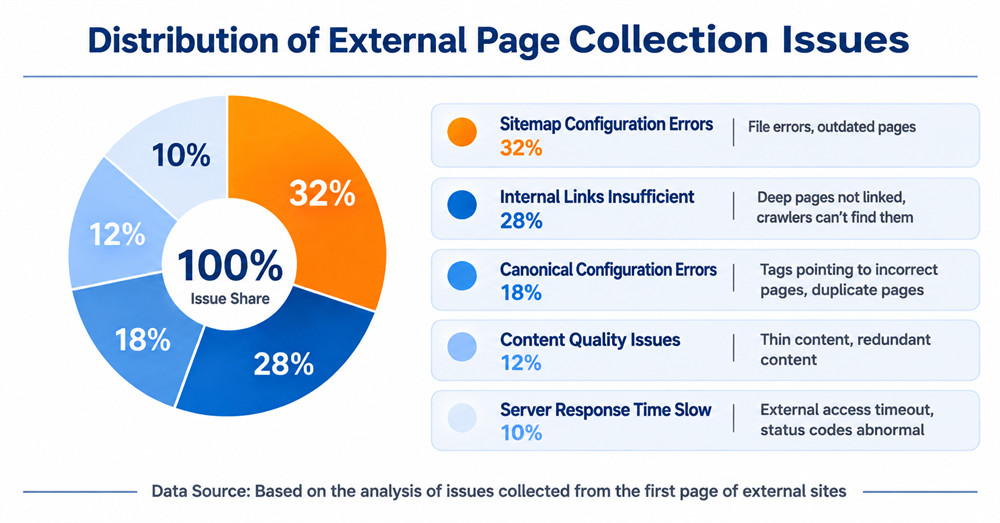
Key takeaway: Sitemap errors are the most frequent reason new pages are not indexed. Roughly 32% of stalled indexing cases stem from a failed sitemap submission or a file format error, which makes this the first place to look when a sitemap has been submitted but pages are still not indexed.
The sitemap is the core file that helps Google's crawler discover pages in bulk, and it is the first step in any standard Google SEO indexing process. Many operators assume that a one-time submission stays valid forever. They overlook issues such as failed file updates, format errors, and invalid URLs, any of which can prevent the crawler from discovering new pages.
Troubleshooting Methods and Common Issues
1. Verify the submission status in GSC: Log in to Google Search Console and open the "Sitemaps" report. Check the last submission time, crawl status, and any error messages for the sitemap file. If the status shows "Couldn't fetch" or "Has errors," the crawler cannot parse the file properly, so new pages will naturally go undiscovered.
2. Validate the file format and content: Open the sitemap URL directly and check whether the file follows standard XML rules. Look for unclosed tags, malformed URLs, and 404 pages included in the file. Common errors include: new pages not being added to the sitemap automatically after launch, a file packed with paginated and parameter pages that dilute the valid URLs, and a file exceeding Google's 50MB size limit.
3. Cross-check with the site: operator: Search with the site:domain operator plus the page path. If the rest of the site is indexed normally but the new page returns no results and does not appear in the sitemap, the delay is almost certainly caused by a sitemap that was not updated in time.
Solution
Fix any incorrect URLs and format problems in the sitemap, and make sure new pages are added to it automatically after launch. Then resubmit the corrected file in GSC to trigger a fresh crawl. When a single page needs to be indexed urgently, submit a crawl request for it directly through the "URL Inspection" tool in GSC instead of waiting for the full sitemap to refresh.
Step 2: Assess Internal Link Depth and Page Discoverability
Key takeaway: Weak internal linking, which makes pages hard to discover, is the second most common reason new pages are indexed slowly. For orphan pages buried more than 3 clicks deep, the probability of being discovered by the crawler drops by more than 40%. This is the most commonly overlooked fundamental in Google SEO indexing.
Google's crawler discovers new content by following links between pages, so your internal link structure directly determines crawl paths and discovery efficiency. Many operators focus only on sitemap submission and neglect the role of internal links, assuming that any page in the sitemap will be indexed. In reality, the sitemap is only a supplementary guide. Internal links are the core signal the crawler uses to judge a page's importance, and they are key to raising its indexing priority.
Troubleshooting Methods and Common Issues
1. Measure click depth: Starting from the homepage, simulate a user's browsing path and count the clicks needed to reach the target page. If it takes more than 3 clicks, the page is considered deeply buried, and its crawl priority will drop significantly.
2. Check for orphan pages: Crawl the entire site with a tool such as Screaming Frog and look for orphan pages that have no internal links pointing to them. Even if these pages are in the sitemap, the crawler treats them as low-value pages with very low indexing priority. They are also a common reason why a site: query returns no results.
3. Check traffic flow from high-authority pages: Review whether your homepage, core category pages, and already-indexed high-authority blog posts link to the new page. A new page with no links from high-authority pages receives little authority transfer, and its indexing cycle will be noticeably longer.
Solution
Improve your internal linking system and bring the click depth of new pages within 3 levels. Add natural anchor-text links to the new page from relevant, already-indexed high-authority pages to guide crawling and pass authority. Add modules such as breadcrumb navigation, related recommendations, and category hubs to strengthen the site-wide internal link network and improve page discoverability. Xiamen First Page's hands-on data shows that adding 2-3 relevant internal links from high-authority pages can shorten the average indexing cycle of a new page by 30%-40%.
Step 3: Verify That Canonical Tags Point to the Correct URL
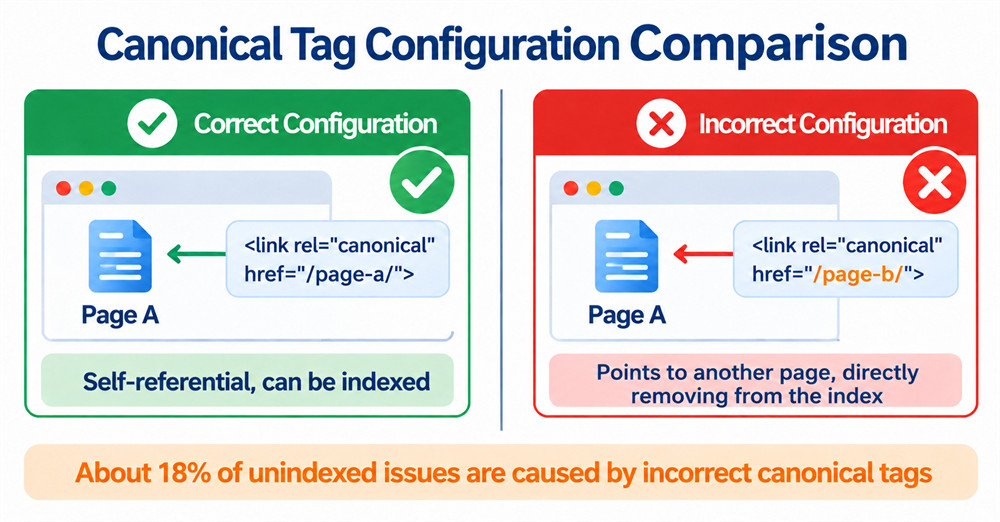
Key takeaway: A misconfigured Canonical tag can keep a page out of the index entirely, making it the most easily overlooked hidden barrier to indexing. Roughly 18% of non-indexed new pages are caused by an incorrect tag target.
The Canonical tag tells Google which page is the authoritative version, preventing duplicate content from diluting authority. If it is misconfigured, for example when a new page's Canonical points to an old page, the homepage, or another unrelated page, Google concludes that the current page is not the authoritative version and simply does not index it. This type of problem is hard to spot in the admin panel and usually requires checking the source code manually.
Troubleshooting Methods and Common Issues
1. Check the page source: Open the source code of the new page and look for the rel="canonical" tag. Confirm that the URL it points to is the current page itself. If it points to another page and there is no legitimate duplicate page behind it, the configuration is wrong.
2. Verify the indexing status in GSC: Enter the page URL in the "URL Inspection" tool in GSC and review the indexing status shown. If it displays "Duplicate, Google chose different canonical than user," the Canonical tag is what is keeping the page out of the index.
3. Check pagination and parameter pages: On some sites, paginated and filtered parameter pages automatically set their Canonical to the first page. If a new page mistakenly inherits this rule, the page will load normally but still fail to be indexed.
Solution
Correct any faulty Canonical tags so that each standalone new page points to itself as the authoritative version. For pages that genuinely are duplicates, plan the Canonical targets deliberately. After making the fix, request indexing again in GSC to prompt Google to re-evaluate the page's eligibility for indexing.
Step 4: Investigate Duplicate Content and Page Quality Issues
Key takeaway: Thin, low-quality content and heavily duplicated content are judged by Google to have no indexing value. This is the core quality-related reason new pages stay unindexed for long periods, and it is a fundamental concern in any Google indexing optimization effort.
Google does not index every page it crawls. Pages go through a quality assessment, and low-value pages are excluded from the index outright. Many operators focus only on technical configuration and neglect the quality of the content itself, assuming that correct technical settings guarantee indexing. In reality, a page that falls short on content quality will not make it into the index no matter how well the settings are optimized.
Troubleshooting Methods and Common Issues
1. Verify originality and differentiation: Compare the new page against other pages on your site and similar content across the web. Check for large-scale copying, heavy homogenization, and thin content. A product page that only copies the manufacturer's specifications with no differentiated information, or a blog post stitched together from scraped content, falls into the low-quality category.
2. Check for on-site duplicate content: Many sites have multiple URL paths leading to the same page, old and new versions of a page coexisting, or highly similar content under different categories. Such on-site duplication leads Google to index only one version, and the new page may be treated as a duplicate and excluded.
3. Identify thin content: Pages with very little core content, low information density, and no substantive value are classic thin content. Blank product pages, or introduction pages with just one image and a single sentence, are common on foreign-trade sites and are mostly judged to have no indexing value.
Solution
Add original content to the page and enrich it with differentiated information such as product specifications, application scenarios, selection guidance, and FAQs to improve its depth and value. Resolve on-site duplicate pages by consolidating them with Canonical tags or 301 redirects. Make sure the content of core pages is complete and meets Google's content quality standards. This is the underlying logic of Google indexing optimization, and it is also the foundation for a page's long-term ranking value.
Step 5: Test Server Response and Crawl Barriers
Key takeaway: Abnormal server responses and crawl barriers are the most hidden indexing problems, accounting for about 10% of indexing failures. For sites with unstable overseas access, the crawler's failure rate rises sharply, which directly leads to slow indexing.
If the first four checks turn up nothing, the next step is to verify the underlying server and crawl environment. Google's crawler accesses your site from overseas nodes. If the server times out, returns the wrong status code, has its IP blocked, or is mistakenly blocked by robots.txt, the crawler cannot read the page content and therefore cannot index it.
Troubleshooting Methods and Common Issues
1. Run a crawl test in GSC: In the "URL Inspection" tool in GSC, run a "Test Live URL" check to see whether Google's crawler can access the page normally. If it shows "URL is not available to Google" or a server error, a crawl barrier exists.
2. Check the status code and response speed: Check the HTTP status code returned by the page. A healthy page should return a 200 status code, while 4xx and 5xx errors prevent indexing. Also test page load speed from overseas nodes. If the time to first byte exceeds 3 seconds, the crawler may time out and abandon the crawl.
3. Check robots rules and IP blocking: Check whether robots.txt mistakenly blocks the page or directory, and whether your server firewall or CDN is blocking Google's crawler IP ranges. Some security policies misidentify crawlers as malicious traffic and intercept their requests.
Solution
Fix server errors and make sure pages return a normal 200 status code. Improve overseas access speed by configuring suitable CDN nodes, and keep the time to first byte within 2 seconds. Review your security policies and whitelist Google's crawler IPs. Correct any rules in robots.txt that block pages by mistake. This is the foundational safeguard for Google SEO indexing, and it is the baseline requirement for speeding up Google indexing.
Additional Actions to Speed Up Indexing After Troubleshooting
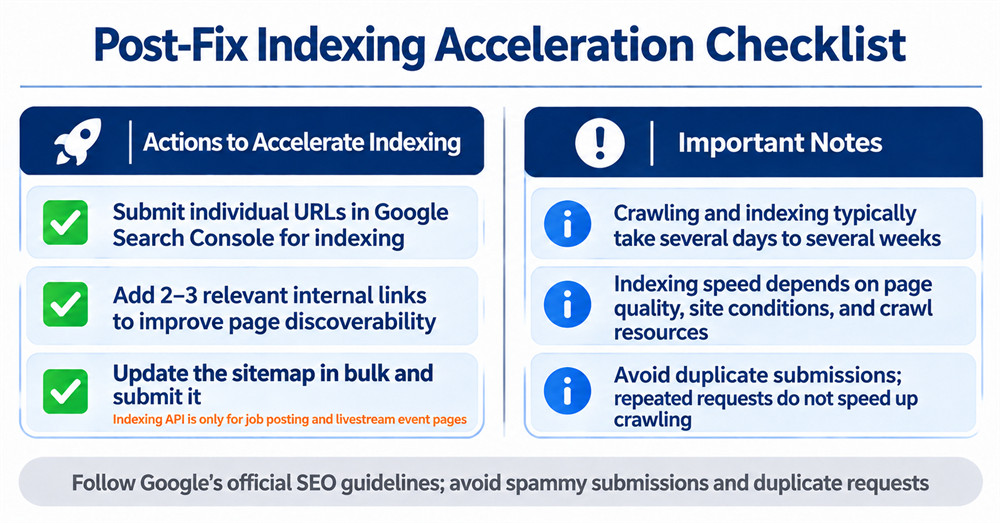
Once the issues have been fixed, two standard actions can further speed up indexing. First, submit a "Request Indexing" for the target page individually in GSC to prompt the crawler to fetch it with priority. Second, for batches of new pages, push URLs proactively through the Google Indexing API to shorten the wait for crawler scheduling.
Keep in mind that indexing speed is influenced by multiple factors, including overall site authority, content quality, and industry competition. Optimizing your configuration can shorten the cycle, but it cannot guarantee instant indexing. Under normal circumstances, for a site with healthy authority, pages gradually enter the index within 1-7 days after the problems are fixed.
A new page that won't get indexed is never an unsolvable mystery. It is a technical problem with a standard troubleshooting logic and a clear path to resolution. By mastering the right Google SEO indexing steps and verifying the five core areas of configuration, internal links, tags, content, and server in order of priority, you can quickly pinpoint the cause of the failure and resolve practical issues such as slow indexing and empty site: query results.
As a Google Partner recognized for excellence for 11 consecutive years, Xiamen First Page brings 20 years of foreign-trade digital marketing experience and has served more than 10,000 export companies. Our SEO services cover the full chain from site technical architecture and indexing optimization to ranking improvement. With a mature indexing troubleshooting and optimization system, we help businesses systematically resolve Google indexing issues and master the core methods for speeding up Google indexing, ensuring that your site content is indexed properly and your traffic potential is fully realized.